NetDecoder - ControlNet Analyzer:
Sniff, Analyze, Debug and Troubleshoot
ControlNet Networks
The NetDecoder
- ControlNet analyzer provides a comprehensive troubleshooting
and diagnostics solution for solving communication problems on ControlNet
networks.
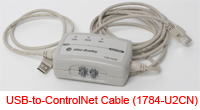 The ControlNet analyzer supports the Rockwell Automation's interface
card:
The ControlNet analyzer supports the Rockwell Automation's interface
card:
- 1784-U2CN for USB interfaces.
The NetDecoder analyzer uses this cards as the sniffer interface into the ControlNet
network. The startup wizard provides the options to run the analyzer.
The NetDecoder analyzer provides a wide range of features to simplify troubleshooting
ControlNet problems.
These features include:
ControlNet Capture Filter
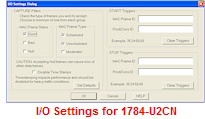 The capture filters for the 1784-U2CN sniffer interface are also available
on the I/O Settings dialog. The capture filters in this case can be defined
on:
The capture filters for the 1784-U2CN sniffer interface are also available
on the I/O Settings dialog. The capture filters in this case can be defined
on:
- Frame Status (GOOD, BAD, NULL).
- Frame Type (SCHEDULED, UNSCHEDULED, MODERATOR).
- Timestamp disabling option.
Once again the options for defining frame status are Good, Bad and Null.
This is the status of the frame as received by the CNA10 ASIC. The options
for defining the frame types are Scheduled, Unscheduled and Moderator. These
definitions are consistent with those in the official ControlNet
specification. The additional filter option available in the 1784-U2CN
interface is that of disabling timestamps. ControlNet traffic has a bit rate
of 5Mbps. When there is heavy traffic on the network and the network
utilization is high, the hardware can drop packets in promiscuous mode. To
avoid dropping frames, the user can disable timestamps and improve packet
capture performance.
ControlNet Start and Stop Triggers
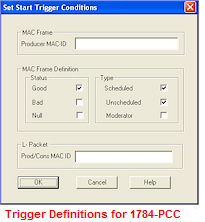 The ControlNet analyzer also provides the user with the ability to set Start
and Stop triggers.
The ControlNet analyzer also provides the user with the ability to set Start
and Stop triggers.
While using the 1784-U2CN sniffer interface, the ControlNet analyzer defines
start and stop triggers on the basis of the frame MAC ID and the
Producer/Consumer MAC ID. The user can enter any legitimate value for these
IDs and the ControlNet analyzer will trigger accordingly. The user can set
the triggers in the I/O settings dialog.
ControlNet Statistics
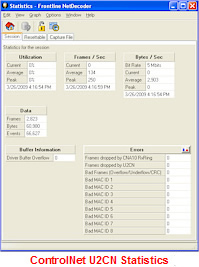 The NetDecoder
-
ControlNet analyzer uses the 1784-U2CN card as the sniffer
interface. The interface cards are designed around the ControlNet CNA10 ASIC.
The ControlNet analyzer gathers information about frames dropped by the
CNA10 ASIC. The protocol analyzer also provides the number of frames that
were dropped by the buffer in the 1784-U2CN device.
The NetDecoder
-
ControlNet analyzer uses the 1784-U2CN card as the sniffer
interface. The interface cards are designed around the ControlNet CNA10 ASIC.
The ControlNet analyzer gathers information about frames dropped by the
CNA10 ASIC. The protocol analyzer also provides the number of frames that
were dropped by the buffer in the 1784-U2CN device.
Other useful ControlNet related error information includes the number of bad
frames received and the MAC IDs of nodes transmitting bad frames. The
ControlNet analyzer maintains a list of the last eight MAC IDs that
transmitted bad frames.
ControlNet Network Monitoring
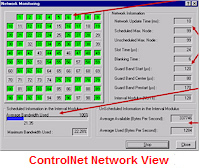 The NetDecoder
- ControlNet analyzer provides a
Network View display. This view provides a complete grid-layout of all the
nodes. The layout reflects the status of RSWho status inquiry of the
network. This display is consistent with the feature provided by Rockwell
Automation's ControlNet traffic analyzer. Active nodes are highlighted in
green and non-existing nodes are shown in grey. Nodes that drop off the
network instantly turn from green to grey indicating a problem. This change
in device status points the network administrator in the direction of the
problem.
The NetDecoder
- ControlNet analyzer provides a
Network View display. This view provides a complete grid-layout of all the
nodes. The layout reflects the status of RSWho status inquiry of the
network. This display is consistent with the feature provided by Rockwell
Automation's ControlNet traffic analyzer. Active nodes are highlighted in
green and non-existing nodes are shown in grey. Nodes that drop off the
network instantly turn from green to grey indicating a problem. This change
in device status points the network administrator in the direction of the
problem.
Apart from, the network layout, the ControlNet network view also provides
statistics on:
- Network Update Time.
- Max Scheduled Node (Smax).
- Maximum Unscheduled Node (Umax).
- Slot time.
- Blanking Time.
- Guard Band information.
- Interval Modulus.
The ControlNet analyzer also provides the used and available scheduled
and unscheduled bandwidth information. This information is very useful for
troubleshooting problems on a ControlNet network.
ControlNet Hardware Settings
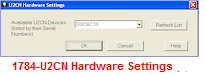 The Hardware Settings dialog allows you to select a device to
sniff/scan. You access the Hardware Settings dialog by selecting Hardware
Settings from the Options menu on the NetDecoder Control window. NetDecoder
automatically scans and identifies all the 1784-U2CN devices plugged into
the PC. These devices, identified by their Serial Numbers, are displayed in
the drop-down list of Available Sniffers.
The Hardware Settings dialog allows you to select a device to
sniff/scan. You access the Hardware Settings dialog by selecting Hardware
Settings from the Options menu on the NetDecoder Control window. NetDecoder
automatically scans and identifies all the 1784-U2CN devices plugged into
the PC. These devices, identified by their Serial Numbers, are displayed in
the drop-down list of Available Sniffers.
To learn more about testing, troubleshooting
and debugging ControlNet networks order your
copy of NetDecoder online.